


Lightgliders
4.295.00 Reviews
App Specs
- Version
- 4.1.2
- Updated On
- License
- Free
- Downloads
- 10,000+
- Developer
- Made to Shine Inc
- Categories
- Educational
- Platform
- Android
Screenshots






 Analysis by AppCompare
Have you ever stumbled upon an app that’s not only fun but also enriches your mind and soul? Well, that’s exactly what I found when I downloaded Lightgliders. It’s not just another game but a whole universe wrapped in positivity and learning. Let me take you on a tour of this digital wonderland and share my two cents along the way.
Who will feel at home here?
I’d point families toward this game when they want play to open a door to conversation rather than simply fill a quiet stretch of time. Its Christian themes make it a particularly natural fit for households that welcome Bible-based activities, while the emphasis on values and cooperation can give parents and children a shared subject to talk about after a session. That focus is also a real boundary: if you want a faith-neutral game, or a straightforward action title with no devotional element, another choice will suit you better.
For a practical routine, I’d use it as a short after-school activity with an adult nearby, then ask the child what a mission or weekly activity made them think about. That turns the educational angle into a conversation instead of expecting a game alone to teach a lasting lesson. It also helps children who are still learning to manage screen time: agree on a stopping point before starting, rather than letting the next activity decide when the session ends.
Before handing a connected game to a younger child, I’d also explore its social areas together and set clear family rules about what to share and when to ask an adult for help. The presence of chat and community features may be a plus for children who enjoy shared play, but it means this is not the same as a purely offline puzzle app. Parents who prefer no social interaction should supervise closely or choose a solo alternative.
First Impressions and Setup
As soon as I opened Lightgliders, I was greeted with vibrant colors and a cheerful atmosphere. It’s like stepping into a world where everything is designed to make you smile. The setup was a breeze, and in no time, I was creating my avatar. The customization options were pretty extensive, allowing me to tweak everything from hair color to outfits. It felt like creating a digital version of myself, ready to embark on some fantastic adventures.
Getting a useful first session
The avatar is more than a decorative opening, because it gives a child a personal way into the setting before the missions and activities begin. I’d let a new player take a few minutes to settle on a look instead of rushing straight through setup; that small choice can make the world feel welcoming. On the other hand, if a child is impatient to start, keep the first visit simple and return to customization later rather than turning appearance choices into a lengthy task.
Lightgliders is a free educational game from Made to Shine Inc, with an Everyone age rating. It has a 4.1 average from around 160 ratings, and more than 10,000 installs. The game first appeared in September 2017, and version 4.1.2 supports Android 5.0 and later. The download is free, while optional in-app purchases range from $5.99 to $99.99 per item, so I’d check the purchase options with a parent before letting a child play unsupervised.
Worth Reading Before You Choose

Baby Panda World Brings Quick Play to Modern Phones, but Its Game Library Feels Busy

ESPN’s Live Game View Makes Following Close Games Easier

QuizzLand Review: A Good Fit for Short Trivia Breaks, Not Every Player

Basketball Stars: Multiplayer Is Fast, but Can It Recover When Matches Go Wrong?

WEBTOON Turns Phone Updates Into a Better Reading Routine

Link to Windows Runs on Shared Habits, Not Social Feeds
Gameplay and Features
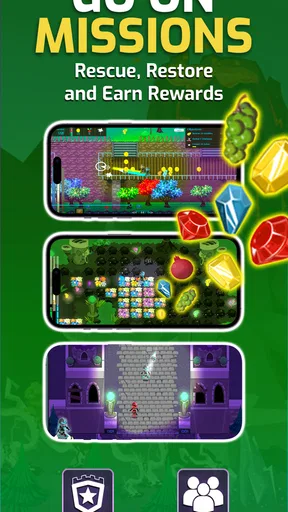
The game offers a mix of action, puzzles, and educational content. I found myself hopping between missions that tested my reflexes and brainpower. What’s cool is how seamlessly it blends fun with learning. The puzzles are cleverly designed to challenge your mind without feeling overwhelming.
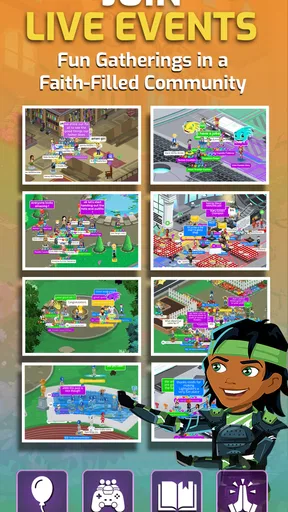
One of my favorite features is the community aspect. There’s a whole world of players out there, and the chat features allow you to interact and collaborate. It’s like a safe social network for kids and families to connect over shared goals and activities.
Deciding how to use missions and community
Because the game shifts between action, puzzles, and learning, I’d treat it as a mixed activity rather than a focused substitute for a workbook or a lesson app. If a child is curious about values or likes to work through challenges, the variety can keep a session from feeling like homework. If they need structured practice in a school subject, a curriculum-led learning app will be a better match; Lightgliders is strongest when play and reflection matter more than measurable drills.
For a child who enjoys interacting with others, the community element can make goals feel less solitary. I would still make the first few visits a shared experience: look at how the child uses chat, discuss what information should stay private, and agree on what to do if an interaction feels uncomfortable. That advice is not a claim about a particular moderation system; it’s a sensible way to introduce any child to a social game. Families who want a completely private experience may prefer a conventional single-player puzzle game.
Learning with Lightgliders
Now, this is where Lightgliders really shines. The educational content is woven into the gameplay beautifully. Kids can learn about values, problem-solving, and teamwork while having a blast. It’s not just about playing games; it’s about developing skills that matter in the real world.
The app also includes weekly Bible-based activities and devotionals. Now, whether you’re into that or not, it’s presented in a way that’s inclusive and uplifting. It’s more about spreading positivity and kindness, which I think we can all get behind.
Making the learning stick
I wouldn’t judge the educational value only by whether a child completes an activity. A better follow-up is to ask them to explain a choice they made in a puzzle or to connect a theme from a devotional with something that happened at school or home. That small habit makes the game a prompt for thought, not a replacement for discussion. It’s especially useful for a parent who wants a low-pressure way to talk about kindness, teamwork, or faith without turning the conversation into a quiz.
The weekly rhythm also suggests a practical trade-off: it can give returning players something to look forward to, but it may be less compelling for a child who wants a self-contained story that can be finished in one sitting. I’d frame it as a place to revisit rather than a game with a single destination. If your child prefers a clear campaign and a definite ending, a narrative adventure may feel more satisfying.
Graphics and Sound
Visually, Lightgliders is a treat. The graphics are bright and engaging, with a style that’s both modern and kid-friendly. It’s like watching your favorite animated movie come to life in your hands.
The sound design complements this perfectly. The background music is cheerful without being distracting, and the sound effects add a nice touch to the overall experience. It’s all about creating an immersive atmosphere, and the developers nailed it.
How the mood shapes a session
The bright art and upbeat audio make the game feel approachable, which matters when a child is reluctant to try something educational. I’d use that welcoming tone as an invitation, not as a reason to leave the game running in the background. For a quiet setting such as a waiting room, lower the device volume or use headphones if appropriate; the visual cheerfulness still carries the mood, while keeping sound from becoming a distraction to people nearby.
That gentle presentation is a strength, but it also means players seeking suspense, realistic action, or a demanding competitive edge may find the experience too mild. The atmosphere is built to feel encouraging rather than intense. I see that as a clear design choice, not a flaw, provided a family is looking for that particular kind of play.
User Experience
From a user experience standpoint, the app is intuitive and easy to navigate. It’s designed with kids in mind, but adults will find it equally engaging. The interface is clean, and I didn’t encounter any glitches or bugs during my time with it. Everything just works, which is refreshing in today’s app landscape.
Cost, device fit, and expectations
Because the game is free to start but offers paid items, I’d treat the listed price as a starting point rather than assume every option is included at no cost. A parent can review purchase settings before a child begins, and it’s worth explaining that a purchase is optional instead of letting an unexpected prompt interrupt play. The range of item prices is broad, so I would make the spending boundary clear in advance.
The Android requirement is version 5.0 or later, which gives older compatible devices a chance to run it, but a supported operating system alone does not tell you how comfortably it will play on a particular phone or tablet. If you’re installing it for a child, try the opening and navigation on the device they’ll actually use before planning a long session. A larger screen may make the colorful world easier to enjoy, while a phone is more convenient for a brief visit away from home.
Lightgliders has a different purpose from many children’s games that focus on rapid rewards, competition, or a single academic subject. Compared with a standard educational drill app, it gives more weight to a playful world, faith-centered activities, and social connection; compared with a conventional action game, it asks the player to engage with learning and values as well. That makes it a distinctive middle ground, though not an all-purpose choice for every child.
Final Thoughts
So, is Lightgliders worth your time? Absolutely. It’s a delightful blend of fun and education, wrapped up in a safe and nurturing environment. Whether you’re a parent looking for a wholesome app for your kids or just someone who loves a good game, this app has something for everyone.
At the end of the day, it’s not just about playing games. It’s about learning, growing, and connecting with others in a meaningful way. And that’s what makes Lightgliders stand out in the crowded app market. Give it a try, and who knows? You might just find yourself coming back for more.
My recommendation
I’d recommend it most to families who are comfortable with Christian content and want a cheerful game that can lead into conversations about choices, cooperation, and faith. It is less suitable for someone looking for formal lessons, a purely offline experience, or a fast-paced game built around challenge and competition. Those expectations matter more than the broad label of “educational.”
My most useful tip is to make the first session collaborative: let the child choose an avatar, explore a mission together, and look at the community features before they use them independently. Then decide on a spending rule and a natural stopping point. With those small choices in place, the game’s mix of color, sound, puzzles, and Bible-based activities has room to work as intended: an inviting play space that can also give families something worthwhile to discuss.
Pros
- Engaging educational content for kids.
- Safe online environment with no ads.
- Encourages positive social interactions.
- Regular updates with new activities.
- Supports Christian values and teachings.
Cons
- Limited offline accessibility.
- Subscription required for full access.
- Might be too niche for non-Christian users.
- Graphics may appear dated to some.
- Requires stable internet connection.
FAQs for Lightgliders
What is the main purpose of Lightgliders?
Lightgliders is a faith-based digital game designed to provide kids with a safe online environment that promotes positive values and character development. The app combines fun gameplay with educational content, aiming to encourage kindness, teamwork, and spiritual growth through adventures and activities.
Is Lightgliders safe for children to use?
Yes, Lightgliders is specifically designed with children's safety in mind. The app features a secure environment free from ads and inappropriate content. Parental controls and settings are available to help monitor and manage your child's activity, ensuring a safe and positive experience.
What types of activities are available in Lightgliders?
Lightgliders offers a variety of activities, including interactive games, weekly challenges, and educational videos. These activities are crafted to teach kids about biblical values and life lessons while keeping them entertained through engaging gameplay and vibrant graphics.
Does Lightgliders require an internet connection to play?
Yes, Lightgliders requires a stable internet connection to access its full range of features. This includes multiplayer interactions, downloading new content, and participating in community events. However, some activities may be available offline once they have been initially downloaded.
Are there any in-app purchases in Lightgliders?
Lightgliders offers a subscription model for accessing premium content and additional features. While the app provides plenty of free content, subscribing unlocks exclusive games, activities, and resources. Parents can manage these purchases through the app store settings to control spending.


